How to Convert iTunes DRM M4V Videos to Play on Samsung Galaxy Note 4

"I have to say this easy program is really useful." more >>
"I have to say this easy program is really useful." more >>
Samsung Galaxy Note 4, with the 5.7 inches wide screen and high resolution, has become a popular portable device to watch movies, TV shows and others types of videos. But if you have a number of movies purchased from iTunes Store and want to play them on your Note 4, it will be difficult. Then the question comes: why can't we import iTunes M4V files to play on Note 4 and how to play iTunes Movies on Galaxy Note 4?
Before getting down to how to watch iTunes movies on Galaxy Note 4, we need to figure out the reason why we can't play M4V movies that we purchased from iTunes Store on Galaxy Note 4.
The M4V file format is a video container format developed by Apple and is very similar to the MP4 format. Apple uses M4V to encode video files like TV episodes, movies, and music videos in its iTunes Store. The copyright of M4V files may be protected by using Apple's FairPlay DRM copy protection. And this kind of videos can only be played on Apple-device. Except for DRM-protected M4V files, unprotected .m4v files may also fail to be played on Samsung Galaxy Note 4 without appropriate player installed.
To play iTunes M4V movies on Galaxy Note 4, the easiest and the most convenient way is to remove iTunes DRM and convert M4V to Galaxy Note 4 compatible format with reliable M4V converter. Here I strongly recommend you M4V Converter Genius, a specially-designed program to convert iTunes DRM M4V movies to Galaxy Note 4, as well as other devices, like iPhone, iPad, iPod touch, HTC, etc. This M4V to Note 4 converter can seamlessly transfer DRM-protected M4V videos as well as unprotected .m4v files to play on Samsung Galaxy Note 4.
Below is a detailed guide on how to convert M4V video for Samsung Galaxy Note 4 on Windows computer. The steps of M4V Converter Genius for Mac are almost the same with the following except for the screenshots.
Free download M4V Converter Genius and install it on your PC.
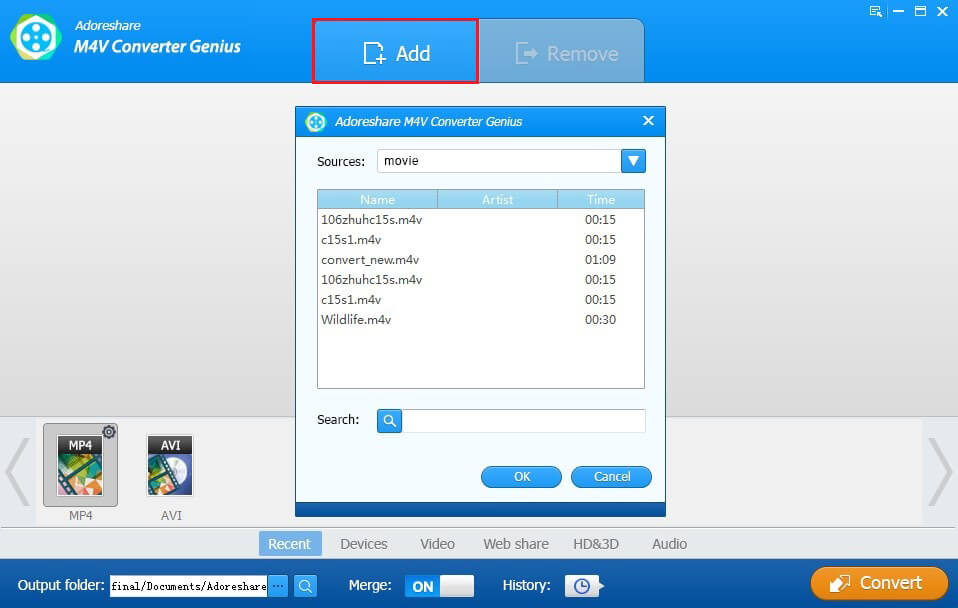
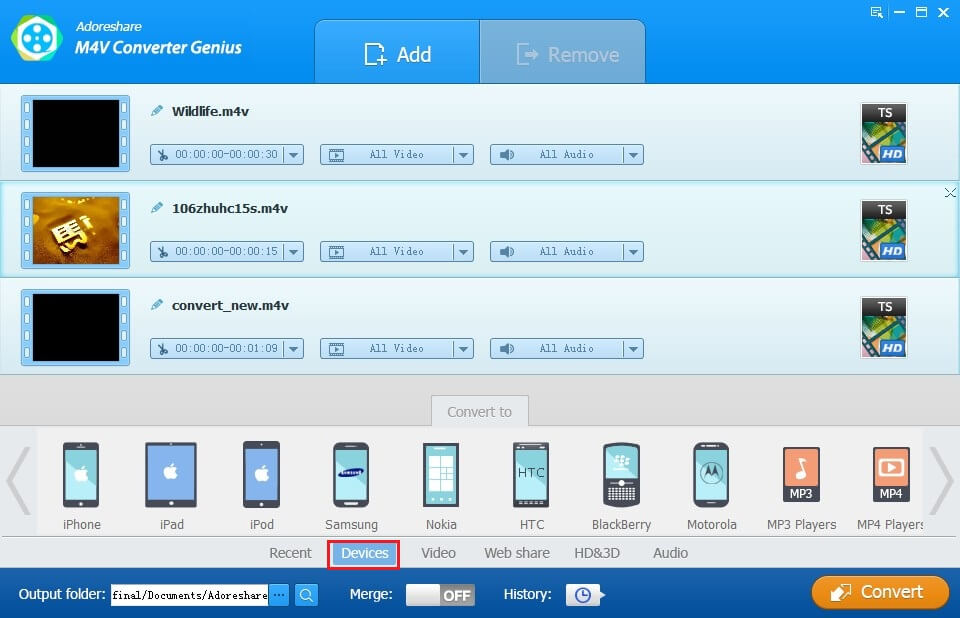
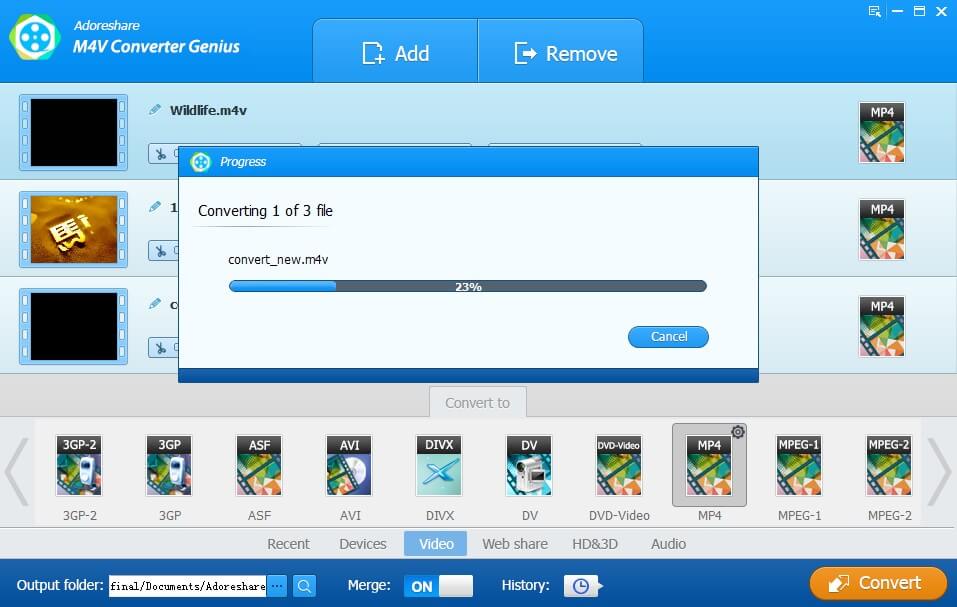
When the conversion finishes, you can open the final folder to check the converted videos. And use USB cable to sync M4V videos to Samsung Galaxy Note 4 for playback.
Learn how to convert iTunes M4V files to Note 4 through the video:
As the most powerful competitor of iPhone 6 Plus, Samsung Galaxy Note 4 will be released on October, 17, 2014. Now let's have a look at the tech specs of Samsung Galaxy Note 4 and iPhone 6 Plus.
Note: Can't play M4V movies on your iPhone 6 or iPhone 6 Plus? Click here to learn How to Convert and Import M4V Videos to iPhone 6/6 Plus.
| Samsung Galaxy Note 4 | iPhone 6 Plus | |
| Size | 1440 x 2560 pixels, 5.7 inches | 1080 x 1920 pixels, 5.5 inches |
| Dimensions | 153.5 x 78.6 x 8.5mm (6.04 x 3.09 x 0.33 in) |
158.1 x 77.8 x 7.1 mm (6.22 x 3.06 x 0.28 in) |
| Weight | 176g (6.21 oz) | 172g (6.07 oz) |
| OS | Android OS, v 4.4.4 (KitKat) | iOS 8 |
| Battery Life | 3220 mAh battery | Non-removable Li-Ion battery |
| CPU | Quad-core 2.7 GHz Krait 450 (SM-N910S) Quad-core 1.3 GHz Cortex-A53 & Quad-core 1.9 GHz Cortex-A57 (SM-N910C) |
Dual-core 1.4 GHz Cyclone (ARM v8-based) |
| Memory | 32 GB, 3GB RAM | 16/64/128 GB, 1 GB RAM |